Salesforce Data Management: Best Practices & Tools (2026)


Your Salesforce org is only as valuable as the data inside it. In Salesforce's State of Data and Analytics research, data and analytics leaders estimated that about a quarter of their organizational data is untrustworthy, and 84% said AI's output is only as good as the data behind it. Duplicate, stale, and inconsistent records are a big part of why — and they pile up every day from web forms, list imports, and integrations. With AI tools like Agentforce now acting directly on CRM data, clean data has shifted from a reporting concern to a business-critical foundation.
Short answer: Salesforce data management is the ongoing practice of keeping CRM data accurate, complete, consistent, secure, and unique. The core best practices are: establish data governance, enforce data quality standards, deduplicate records, automate ongoing hygiene, standardize formats, secure and stay compliant, back up your data, and measure quality continuously. Most teams combine Salesforce's native features with an AppExchange tool to cover what native can't — bulk merging, cross-object matching, and ongoing automation.
This guide breaks down eight practical best practices for managing Salesforce data in 2026, the tools that help you execute each one, and a simple framework for building your own data management plan.
In this article:
- What Is Salesforce Data Management?
- Why Data Management Matters More in 2026
- 8 Salesforce Data Management Best Practices
- Best Salesforce Data Management Tools in 2026
- How No Duplicates Puts These Practices Into Action
- How to Build a Data Management Plan
- Key Takeaways
- FAQ
What Is Salesforce Data Management?
Salesforce data management is the practice of keeping CRM data accurate, complete, consistent, secure, and free of duplicates. It's broader than a one-time cleanup — it's an ongoing discipline that keeps your data trustworthy so users rely on it, reports reflect reality, and automation (including AI) behaves predictably.
Effective data management combines:
- Governance — the policies and ownership that define how data is created, changed, and retired.
- Data quality — validation, standardization, and cleansing to keep records correct.
- Deduplication — preventing and resolving duplicate records.
- Security & compliance — controlling who sees what, and meeting regulations like GDPR, HIPAA, and SOC 2.
- Backup & recovery — protecting against accidental loss or bad bulk operations.
- Measurement — tracking quality metrics so you know whether things are improving.
Salesforce provides native building blocks for most of these. Where native features stop — bulk merging, cross-object matching, scheduled automation, and quality analytics — teams add AppExchange tools to fill the gap.
Why Data Management Matters More in 2026

Three forces have pushed data management from "nice to have" to business-critical:
1. AI runs on your data. Agentforce and other AI features generate answers and take actions based directly on the records in your org. In Salesforce's research, 42% of leaders said they lack full confidence in their AI outputs — often because the underlying data is disconnected or out of date. Duplicate and inconsistent records make AI confidently wrong.
2. Most data strategies aren't AI-ready. The same State of Data and Analytics research found that 84% of data and analytics leaders believe their data strategy needs an overhaul before their AI ambitions can succeed. Data management is the work that closes that gap.
3. Bad data has a real, ongoing cost. Duplicate and stale records inflate pipeline reports, waste sales reps' time, and trigger duplicate outreach that erodes customer trust. Because new records flow in and existing ones go stale every day, the problem compounds whenever data is left unmanaged.
The takeaway: data management has to be continuous and partly automated. The eight practices below are designed with that in mind.
8 Salesforce Data Management Best Practices
1. Establish Data Governance and Ownership
Governance is the foundation. Without clear rules, every other practice degrades over time. Define:
- Ownership — who is accountable for the quality of each object (Accounts, Contacts, Leads, custom objects).
- Standards — naming conventions, required fields, picklist values, and formatting rules.
- Retention — how long records are kept and when they're archived or deleted (important for GDPR compliance).
- A data dictionary — documentation of what each field means and how it should be used, which prevents the slow drift that creates inconsistent data.
Tip: Document governance decisions in a shared data dictionary and review it quarterly. Salesforce's built-in Data Management best practice guidance is a good starting reference.
2. Enforce Data Quality Standards
Data quality is usually measured across five dimensions: completeness, accuracy, consistency, validity, and uniqueness. Enforce them at the point of entry wherever possible:
- Validation rules block records that don't meet your format or business rules.
- Required fields and picklists prevent incomplete or free-text inconsistency.
- Flow Builder can automate complex validation and field standardization (for example, normalizing phone formats on save).
The fifth dimension — uniqueness — is the one Salesforce can't fully enforce on its own. Native tools detect duplicates but can't bulk-merge them, which is where practice #3 comes in.
3. Deduplicate and Keep Records Unique
Duplicates are the most common and most damaging data quality problem. They inflate reports, split activity history, and confuse both reps and AI. A complete deduplication approach has three layers:
- Prevention — Salesforce Duplicate Rules alert or block users when they create a matching record.
- Detection — Matching Rules define what counts as a duplicate using exact and fuzzy comparison.
- Resolution — merging duplicates into one master record.
Native Salesforce stops at resolution: you can only merge up to three records at a time, with no cross-object matching and no scheduling. To resolve duplicates at scale, No Duplicates adds 24+ auto-merge strategies, cross-object matching (for example, Leads against existing Contacts), and advanced fuzzy algorithms — all while keeping data inside your org. For the full walkthrough, see How to Deduplicate Salesforce Data and How to Merge Duplicate Records in Salesforce.
4. Automate Ongoing Data Hygiene
Because data decays continuously, manual cleanups don't keep up. Automate the routine work:
- Scheduled scans detect new duplicates on a daily, weekly, or custom cron schedule.
- Auto-merge rules resolve high-confidence matches automatically while flagging fuzzy matches for review.
- Auto-conversion turns matching Leads into existing Contacts before cross-object duplicates accumulate.
Tools that run cron-based scheduled scans keep the org clean with minutes of oversight a week instead of multi-day cleanup projects.
5. Standardize and Normalize Data
Inconsistent formatting silently breaks matching, reporting, and segmentation. "Acme Corp," "Acme Corporation," and "ACME" look like three companies to a report. Standardize:
- Phone and address formats
- State and country values (use picklists)
- Company name conventions
- Trimmed whitespace and consistent capitalization
Normalizing data before you run deduplication produces far better match accuracy — better data in means better matches out.
6. Secure Data and Stay Compliant
Data management is also a security responsibility. Use Salesforce's profiles, permission sets, field-level security, and sharing rules to control access on a need-to-know basis. Just as important is where your data is processed: tools that send data outside Salesforce for matching expand your compliance surface.
A 100% native app like No Duplicates processes data entirely inside your Salesforce org, so records never leave the platform — which simplifies compliance with GDPR, HIPAA, and SOC 2. You can read more on the No Duplicates security model.
Tip: When evaluating any data management app on the AppExchange, check whether it is "Native" or "Non-native" in the listing — this tells you whether your data is processed inside or outside Salesforce.
7. Back Up and Archive Data
Even well-managed orgs need a safety net. Bulk operations — especially merges — are permanent in native Salesforce, with no undo. Protect yourself:
- Schedule weekly or monthly data exports under Setup.
- Use Salesforce Backup (paid add-on) for point-in-time recovery, or a free native tool like Data Loader for Salesforce for ad-hoc exports and bulk import/export.
- Always export affected objects before any large merge or mass-update operation.
- Define an archiving strategy for aged records to keep storage and performance in check.
8. Measure and Document Data Quality
You can't improve what you don't measure. Track a few core metrics over time:
- Duplicate rate — what share of records are duplicates? It should trend down.
- Completeness — what percentage of records have key fields populated?
- Merge volume — a sudden spike usually means a new duplicate source (an import or integration).
A duplicate analytics dashboard and exportable merge reports let you quantify data quality and show progress to stakeholders instead of guessing.
Best Salesforce Data Management Tools in 2026
No single tool covers every part of data management. Rather than one mega-app, most teams assemble a small stack by category — combining Salesforce's native features with a focused AppExchange add-on where native stops. The AppExchange data management category is broad, so it helps to map needs to tools:
| Data management need | Native Salesforce | Where an add-on helps |
|---|---|---|
| Deduplication & data quality | Duplicate Rules & Matching Rules (detection/prevention only) | No Duplicates — bulk merge, cross-object matching, scheduled scans, analytics |
| Backup & recovery | Scheduled data export; Salesforce Backup (paid add-on) | Data Loader for Salesforce (free, native) for ad-hoc export/import |
| Governance & documentation | Field-level security, validation rules, picklists | Data dictionary / metadata documentation tools |
| Integration & enrichment | Flow, External Objects | Enrichment and iPaaS connectors |
For the deduplication and data-quality layer — the part native Salesforce leaves unfinished — we recommend leading with No Duplicates: a 100% native app used by organizations managing millions of records, with every feature included at every tier and unlimited users (rated 5.0 stars on the AppExchange).
If you're specifically choosing a dedup tool and want a vendor-by-vendor breakdown — Cloudingo, DataGroomr, DemandTools, and Plauti, with current pricing and architecture — see the dedicated comparison instead of a duplicate table here: Best Salesforce Deduplication Tools in 2026, plus the head-to-head pages for Cloudingo, DataGroomr, DemandTools, and Plauti.
How No Duplicates Puts These Practices Into Action
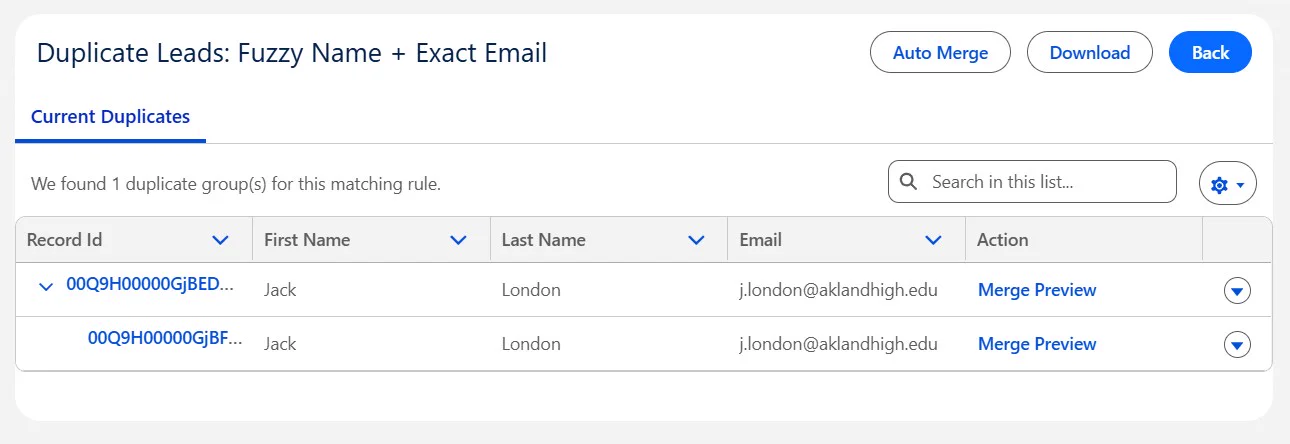
Here's how No Duplicates maps to the eight practices above — turning each into an automated, in-org workflow:
| Best practice | How No Duplicates helps |
|---|---|
| Enforce data quality (uniqueness) | Configurable matching rules with exact and advanced fuzzy matching |
| Deduplicate records | 24+ auto-merge strategies plus custom Salesforce Flow support; cross-object matching |
| Automate ongoing hygiene | Cron-based scheduled scans and auto-merge for high-confidence matches |
| Secure data & stay compliant | 100% native — data never leaves your org (GDPR / HIPAA / SOC 2 friendly) |
| Measure data quality | Duplicate analytics dashboard and exportable merge reports |
| Back up before bulk ops | Pairs with the free Data Loader for Salesforce for pre-merge exports |
Put these practices on autopilot. No Duplicates runs entirely inside your Salesforce org — spin it up on a sandbox at no cost, validate your matching and merge rules against real data, then schedule it to keep production clean.
How to Build a Data Management Plan
You don't need a six-month project to get started. A practical plan follows five steps:
- Assess. Audit current data quality — duplicate rate, field completeness, and where bad data enters (forms, imports, integrations).
- Govern. Assign object ownership, document standards in a data dictionary, and set retention rules.
- Prevent. Turn on validation rules and Salesforce Duplicate Rules so new bad data stops at the door.
- Clean and automate. Deduplicate the existing backlog, then schedule ongoing scans and auto-merge so the org stays clean.
- Measure and iterate. Track quality metrics monthly, refine matching and validation rules, and review governance quarterly.
Tip: Start on a sandbox. Validate your matching rules and merge strategies against real data risk-free before touching production — No Duplicates is free on sandboxes.
Key Takeaways
- Data management is continuous, not a one-time cleanup. New records flow in and existing ones go stale every day, so ongoing automation beats periodic projects.
- Govern first, then enforce quality. Clear ownership, standards, and a data dictionary prevent problems at the source across all five quality dimensions.
- Uniqueness is the gap native Salesforce leaves open. Salesforce detects duplicates but can't bulk-merge them — the resolution layer needs an AppExchange tool.
- Clean data is now an AI requirement. Agentforce and other AI features produce reliable output only when the underlying records are accurate and deduplicated.
- Keep data in-org for compliance. A 100% native tool processes data inside Salesforce, simplifying GDPR, HIPAA, and SOC 2.
- The right tooling makes it routine. Matching rules, auto-merge, scheduled scans, and analytics turn these practices into a few minutes of oversight a week — free to try on a sandbox.
Frequently Asked Questions
What is Salesforce data management?
Salesforce data management is the ongoing discipline of keeping CRM data accurate, complete, consistent, valid, secure, and free of duplicates. It spans governance (who owns and controls data), data quality (validation and cleansing), deduplication, security and compliance, backup and archiving, and measurement. The goal is trusted data that users, reports, and AI tools can rely on. Salesforce provides native building blocks; teams add AppExchange tools like No Duplicates where native features stop.
What are the five dimensions of data quality in Salesforce?
The five widely used dimensions are completeness (no missing required values), accuracy (values reflect reality), consistency (the same fact matches across records and objects), validity (values follow the correct format and rules), and uniqueness (no duplicate records). Uniqueness is the dimension most often neglected, because Salesforce can detect duplicates natively but cannot bulk-merge them.
How often should I audit Salesforce data quality?
Run a lightweight automated check weekly — most teams schedule a duplicate scan and a validation-rule exception report. Conduct a deeper manual audit (field completeness, stale records, governance review) quarterly. Because new records flow in continuously and existing ones go stale over time, ongoing monitoring beats periodic one-time cleanups. A scheduled tool that flags issues automatically keeps the effort to minutes per week.
Why is clean Salesforce data important for AI and Agentforce?
AI features like Agentforce generate responses and take actions based on the data in your org. Duplicate, incomplete, or inconsistent records lead to wrong answers, double-counted pipeline, and misrouted actions. Clean, deduplicated, well-governed data is a prerequisite for trustworthy AI output — which is why data quality has become a top priority for teams adopting AI in 2026.
What is data governance in Salesforce?
Data governance is the set of policies, roles, and processes that define how data is created, accessed, updated, retained, and deleted. In Salesforce it covers field ownership, naming standards, picklist values, validation rules, retention schedules, and who is accountable for each object's quality. Good governance prevents quality problems at the source instead of cleaning them up later.
Do I need a third-party app for Salesforce data management?
Salesforce's native features cover prevention (Duplicate Rules), validation rules, and scheduled exports. For bulk merging, cross-object matching, scheduled deduplication, and quality analytics, most teams add an AppExchange tool. A 100% native app like No Duplicates handles these at scale while keeping data inside Salesforce, which simplifies HIPAA, GDPR, and SOC 2 compliance.
How do I back up Salesforce data?
Salesforce offers scheduled data exports (weekly or monthly) under Setup, and Salesforce Backup is available as a paid add-on for point-in-time recovery. For ad-hoc exports and bulk import/export, a free native tool like Data Loader for Salesforce works well. Always export affected objects before bulk operations such as merges, since native merges cannot be undone.
Disclosure: This guide is published by the team behind No Duplicates, a 100% native Salesforce deduplication app rated 5.0 stars on AppExchange. Competitor details and pricing reflect publicly available information as of the date below and may change — we encourage you to verify directly with each vendor and with Salesforce for the most current details.
Accurate as of May 2026.