Identify Duplicate Emails and Phones
This guide explains how to identify duplicate emails or phone numbers that may be scattered across different fields using custom formula fields and specialized matching types.
The Problem
Sometimes duplicate emails or phone numbers may be scattered across different fields, making it challenging to identify them using single-field matching methods.
For example:
- Email addresses might be in both
EmailandPerson_Email__cfields - Phone numbers might be in
Phone,Mobile, andHome_Phone__cfields - Standard matching methods only check one field at a time
The Solution
Use a Custom Formula (Text) field that combines emails or phones in a single field using a semi-colon as delimiter, in conjunction with:
- Email List [Formula Field] matching type for emails
- Phone List [Formula Field] matching type for phone numbers
This approach allows the system to check multiple fields simultaneously and find duplicates across all of them.
Implementation
Step 1: Create a Formula Field
- Create a new Formula (Text) field
- Name it Email List (or Phone List for phone numbers)
Step 2: Configure the Formula
-
In the formula editor, input API names of the email fields separated by semi-colon character
;Example for emails:
Email + ';' + Person_Email__c
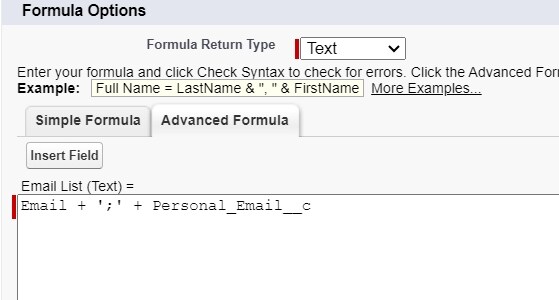
Example for phones:
Phone + ';' + Mobile + ';' + Home_Phone__c
- Save the formula field
Step 3: Use in Matching Rules

- Select the Email List (or Phone List) field as a matching field
- Choose the Email List [Formula Field] (or Phone List [Formula Field]) matching type
- Click Save & Continue button
How It Works
- The formula field combines values from multiple fields into one field
- The matching type checks if any value in the combined field matches any value in the other record's combined field
- This allows finding duplicates even when the same email/phone appears in different fields across records
Best Practice: Include all relevant email or phone fields in your formula to ensure comprehensive duplicate detection.